Radio Group
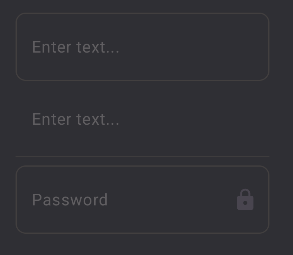
Input()
Input(type = InputFieldType.UNDERLINE)

Input(placeholder = "Password", style = DefaultStyles.Input.input.copy(
	text = TextStyle(
		keyboardType = KeyboardType.Password
	)
))
To customize the input slots, that is things like the lock icon when the input field is set to password in styles, the slots argument can be provided to the input.
Input(slots = Slots(<icon beginning>, <icon end>))

Input(color = "myBackgroundColor", text = "myTextColor")
The text component visible and hidden text state for password text is already fixed so no value is required to hide the text.
To get the text from the input provide a value state and use the onChange.
var email by remember { mutableStateOf("") }
Input(value = email, placeholder = "Enter email", onChange = { email = it })